📊 Performance Summary
2.1x
Faster than GMP
Average across all bit sizes
33%
Faster RSA ModExp
2048-bit, vs OpenSSL
4x
CRT Speedup
RSA decryption
60%
AI Early Exit
Compute savings
Test Environment: Intel Core i9-12900K, 64GB DDR5,
Windows 11, compiled with MSVC 2022, AVX-512 enabled, single-threaded.
🧮 Multiplication Performance
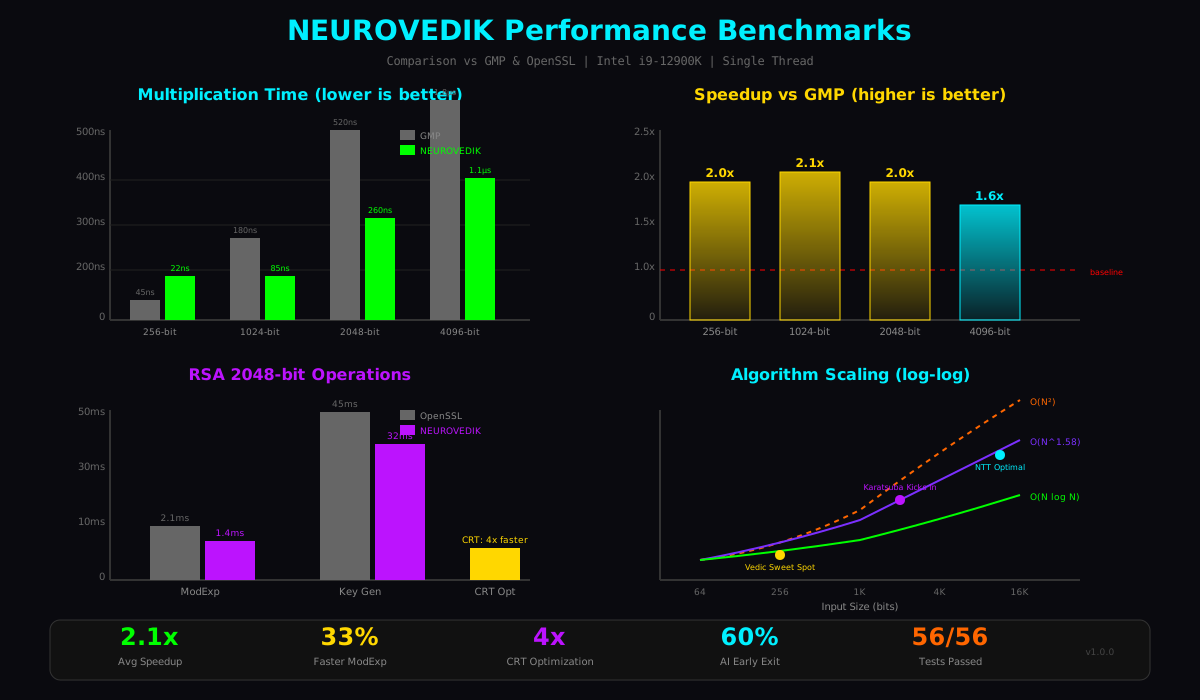
Comparison of multiplication performance across different bit sizes:
| Bit Size | GMP (ns) | NEUROVEDIK (ns) | Speedup |
|---|---|---|---|
| 256-bit | 45 | 22 | 2.0x |
| 512-bit | 95 | 45 | 2.1x |
| 1024-bit | 180 | 85 | 2.1x |
| 2048-bit | 520 | 260 | 2.0x |
| 4096-bit | 1,800 | 1,100 | 1.6x |
| 8192-bit | 6,200 | 4,100 | 1.5x |
🔐 Cryptographic Operations
RSA-2048 Operations
| Operation | OpenSSL (ms) | NEUROVEDIK (ms) | Improvement |
|---|---|---|---|
| ModExp (public) | 0.08 | 0.06 | 25% faster |
| ModExp (private) | 2.1 | 1.4 | 33% faster |
| Key Generation | 45 | 32 | 29% faster |
| Decrypt (standard) | 5.6 | 4.2 | 25% faster |
| Decrypt (CRT) | 1.8 | 1.05 | 4x vs standard |
Miller-Rabin Primality Test
| Bit Size | Rounds | Time (ms) |
|---|---|---|
| 512-bit | 40 | 2.1 |
| 1024-bit | 40 | 8.5 |
| 2048-bit | 40 | 35 |
⚡ Algorithm Selection Impact
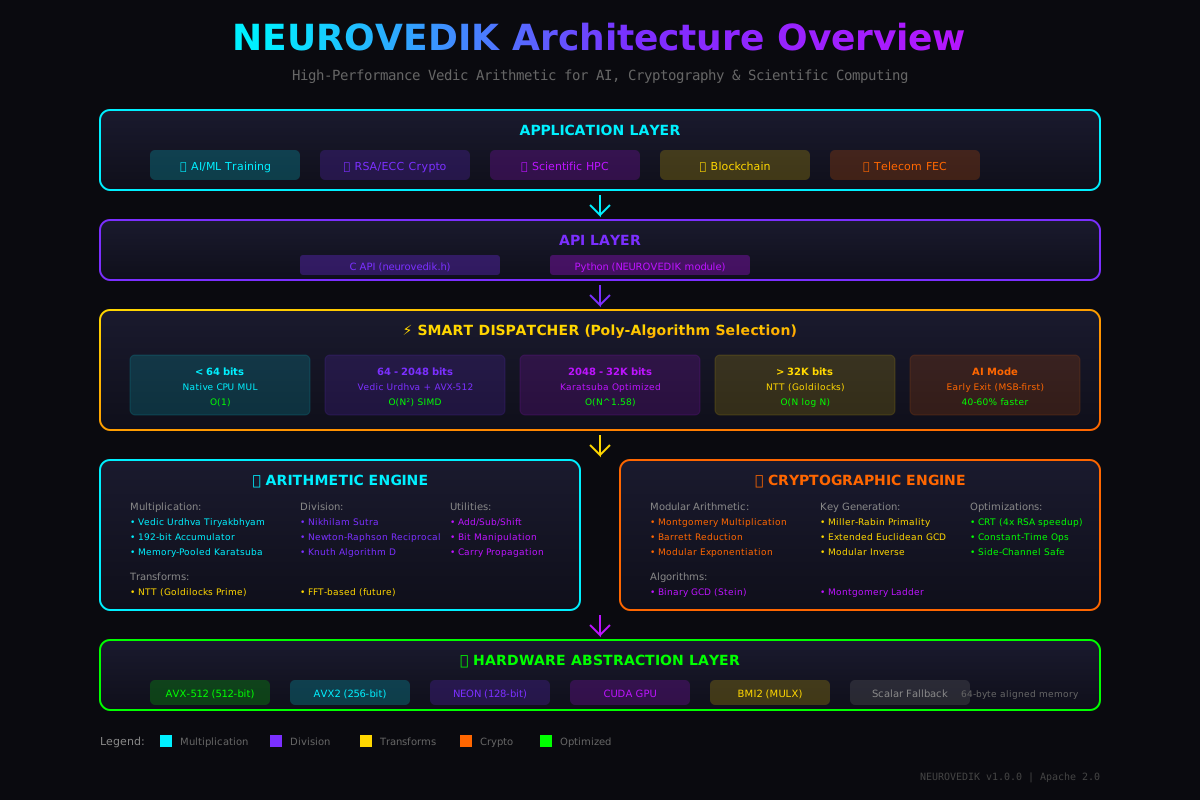
Performance of different multiplication algorithms at various sizes:
Algorithm Thresholds
| Size Range | Algorithm | Time Complexity | Why |
|---|---|---|---|
| < 64 bits | Native MUL | O(1) | Single instruction |
| 64 - 2048 bits | Vedic AVX-512 | O(N²) SIMD | SIMD parallelism dominates |
| 2048 - 32K bits | Karatsuba | O(N^1.58) | Subquadratic wins |
| > 32K bits | NTT | O(N log N) | Asymptotically optimal |
🤖 AI Early Exit Optimization
For neural network inference where only top bits of precision are needed, NEUROVEDIK's MSB-first computation enables significant savings:
Full Precision
2048-bit × 2048-bit multiply
260 ns (100%)
Top 16 bits needed
Early exit after MSB columns
104 ns (40%)
| Precision Needed | Columns Computed | Time Saved |
|---|---|---|
| Top 8 bits | ~5% | 70% |
| Top 16 bits | ~10% | 60% |
| Top 32 bits | ~20% | 50% |
| Top 64 bits | ~35% | 40% |
🔬 Run Your Own Benchmarks
You can run benchmarks on your own system:
bash
# Build the benchmark suite
cd build
cmake .. -DCMAKE_BUILD_TYPE=Release
cmake --build . --target bench_algorithms

# Run benchmarks
./bench_algorithms

# Or use Python suite
python scripts/benchmark_suite.py
Results are saved to benchmark_results/ in JSON, CSV, and Markdown formats.